contact us

Production deployment

SOP-Driven Process Automation

Turn SOPs into governed playbooks that AI agents can execute.

Audit and improve operational knowledge, turn approved procedures into governed playbooks, and connect them to AI assistants and workflow agents for more consistent execution.

Running in production: one connected solution from knowledge audit to controlled workflow execution.

AI & AutomationKnowledge & Process

Download solution overview (PDF)

  1. 1SOPs & knowledge articlesAudited and improved with experts in control
  2. 2Governed playbooksSteps, rules, approvals and owners
  3. 3AI assistant & workflow agentsGuidance and controlled execution
Simplified view of the deployed production solution.

When this matters

  • SOPs are outdated, inconsistent or difficult to maintain.
  • Knowledge is scattered across documents, portals, tickets and people's heads.
  • Employees ask the same questions repeatedly.
  • Service and operations teams spend too much time redirecting users.
  • Automation must be grounded in approved procedures.
What it does

  • Audits existing SOPs and knowledge articles.
  • Finds missing steps, inconsistencies and unclear requirements.
  • Generates more structured, improved operational content.
  • Converts procedures into reusable, governed playbooks.
  • Connects approved playbooks to assistants and controlled workflow execution.

Business value

  • Faster employee self-service and fewer repetitive tickets.
  • More consistent execution across teams and locations.
  • Better compliance, oversight and auditability.
  • Less manual work for service and operations teams.
  • A foundation for agentic process automation.

Business value describes what the solution is designed to deliver; no measured customer results are claimed on this page.

The connected workflow

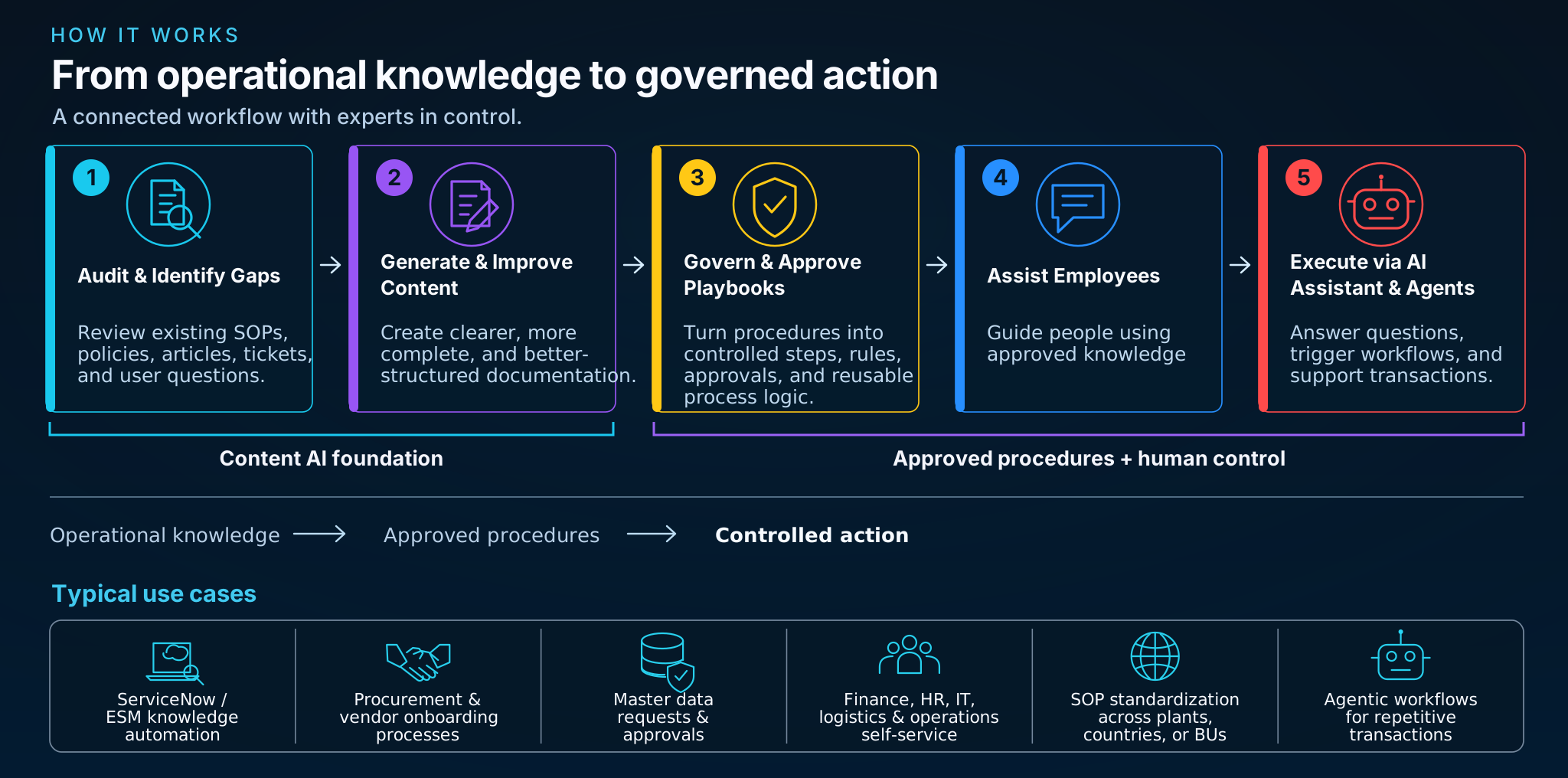
How it works: five connected stages of the production solution - Audit and identify gaps, Generate and improve content, Govern and approve playbooks, Assist employees, Execute via AI assistant and agents - with the Content AI foundation, approved procedures and human control, and six typical use cases.
Simplified view of the deployed production workflow. Open full image

01

Audit & Identify Gaps

  • Evaluate existing SOPs and knowledge articles.
  • Detect unclear, missing or outdated information.
  • Assess and prioritize content quality issues.
  • Identify gaps from tickets, searches and questions.

Output: a reviewed gap and quality picture with prioritized improvements.

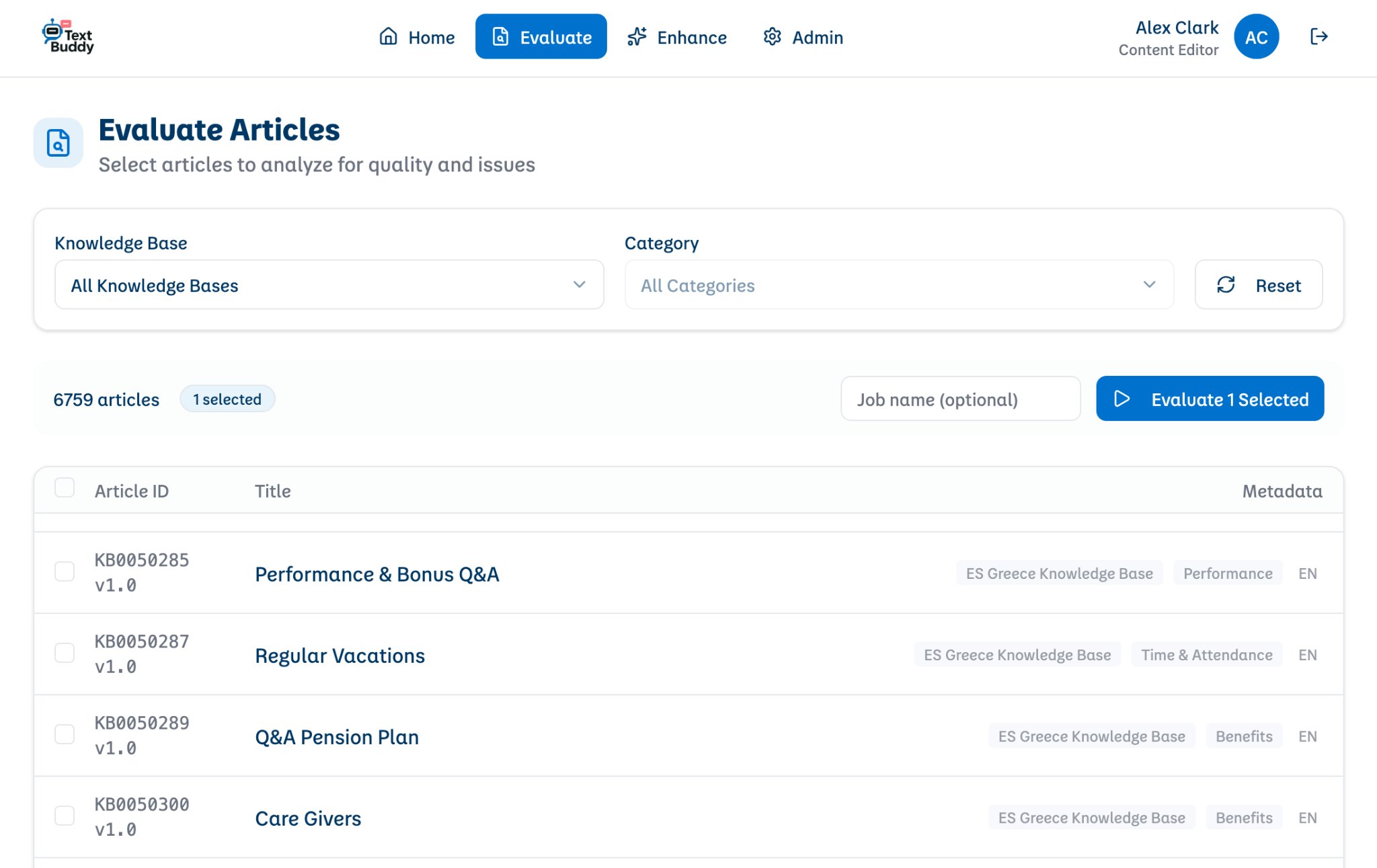
Text Buddy Evaluate Articles screen with knowledge-base and category filters, an article count, a list of articles and the Evaluate Selected action.
Evaluate Articles - selecting a knowledge base and articles for a quality evaluation.
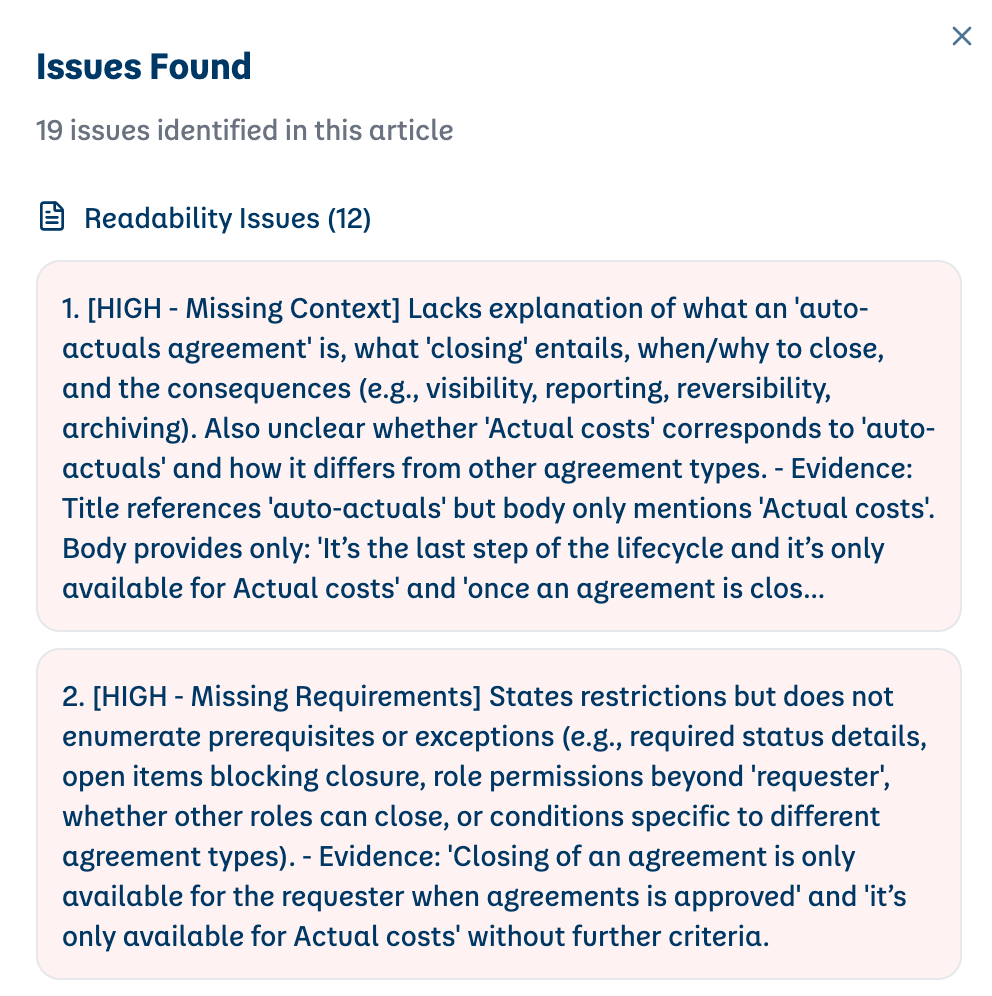
Text Buddy Issues Found panel: 19 issues identified in an article, listing high-priority Missing Context and Missing Requirements findings with evidence.
Issues Found - prioritized findings such as missing context and missing requirements, with evidence.

02

Generate & Improve Content

  • Generate new SOPs from notes, templates or process inputs.
  • Improve weak articles into structured, user-friendly instructions.
  • Apply brand, terminology and compliance rules.
  • Submit improved material for expert review and publication.

Output: clearer, maintainable operational guidance.

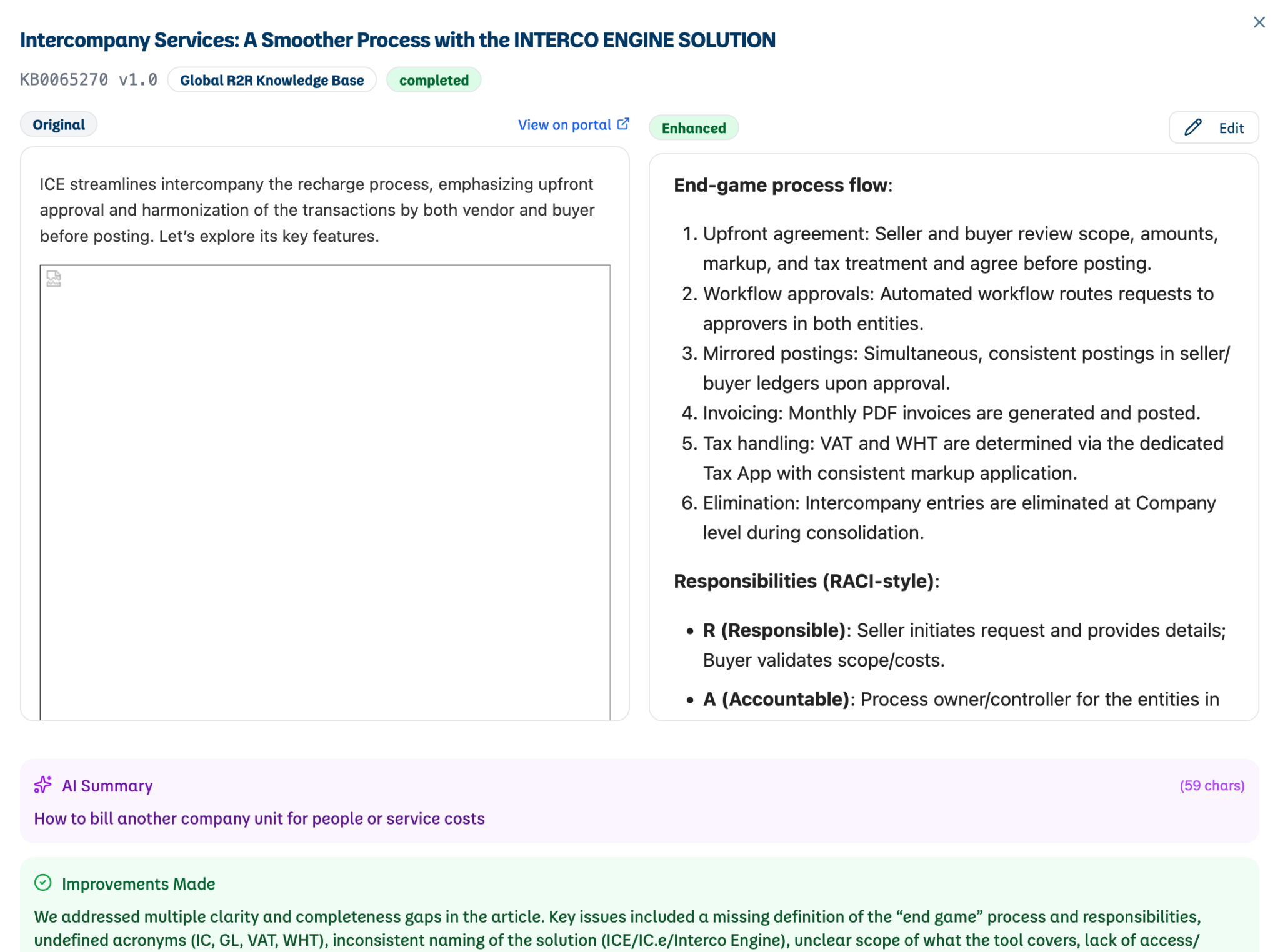
Text Buddy article view comparing the original and enhanced versions of an intercompany process article, with an AI summary and an Improvements Made note.
Original versus enhanced - the proposed improvement shown next to the original for expert review before publication.
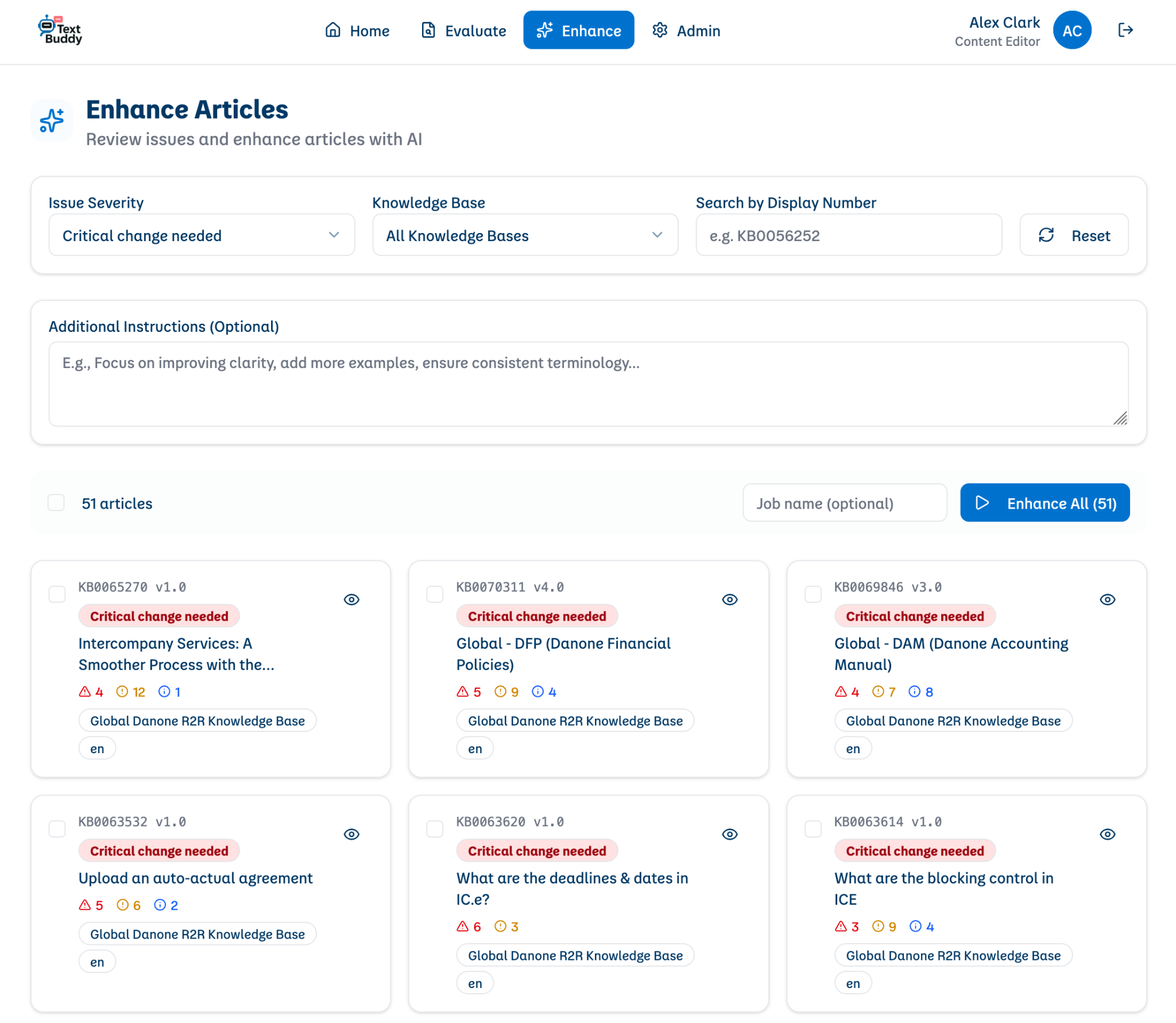
Text Buddy Enhance Articles screen with issue-severity and knowledge-base filters, an optional instructions field and article cards marked critical change needed.
Enhance Articles - choosing articles by severity and adding editorial instructions before AI-assisted improvement.

Screens above: authentic Text Buddy screens from the Content AI Toolkit production application, the knowledge component of this solution, published with permission. They show stages 1-2 only. Explore the Content AI Toolkit case

03

Govern & Approve Playbooks

  • Convert approved procedures into steps, rules and decision logic.
  • Define triggers, owners, inputs and expected outcomes.
  • Define approvals, exceptions and escalations.
  • Maintain appropriate human oversight, change control and auditability.

Output: approved, reusable process logic.

04

Assist Employees

  • Search connected operational knowledge sources.
  • Give referenced answers grounded in approved material.
  • Maintain relevant conversation context.
  • Guide users through procedures and route requests to workflows.

Output: employee self-service, guidance and structured requests.

05

Execute via AI Assistant & Agents

  • Route requests to the appropriate agent or workflow.
  • Exchange information with permitted business systems.
  • Orchestrate multistep processes and approvals.
  • Return status and results to the requesting employee.

Output: controlled operational actions and completed requests.

The five capabilities map to the four phases used in our product sheet - Audit, Improve, Govern and Execute - where Execute covers both employee assistance and workflow execution.

Example application

"What is the status of my invoice?"

A representative journey showing how the stages work together for a recurring finance request. It illustrates the approach; it is not a record of a specific customer's live transactions or systems.

  1. 1

    Employee question

    An employee asks the assistant about the status of a supplier invoice, in their own words.

  2. 2

    Approved procedure

    The assistant matches the request to the approved invoice-status playbook and the reviewed knowledge behind it.

  3. 3

    Required data and decision

    The playbook defines what is needed - for example the supplier and invoice reference - and which checks apply before any lookup.

  4. 4

    Controlled action or human approval

    A permitted agent retrieves the status from the connected system; anything outside the defined rules is routed to the responsible team.

  5. 5

    Status and result

    The employee receives the status and the next step, with the request handled consistently and recorded for audit.

Illustrative applications

Vendor onboarding
Collect supplier details, check completeness against the procedure and obtain approval before creating a record.
Master data requests
Apply defined fields, validation rules and owner approvals to new or changed records.
Work orders and expense approvals
Prepare transactions from employee requests and execute only within the process’s approval limits.
Ticket submission
Create a structured ticket with the captured context when self-service cannot resolve a question.

Governed playbook structure

  1. TriggerEvent or user request
  2. StepsDefined actions and tasks
  3. Rules & decisionsConditions and business rules
  4. Human approvalWhere needed
  5. OutcomeCompleted process

Each playbook has an owner. Changes go through review before they are published, playbooks are versioned, and approvals and escalation points are defined for the steps that need them. Requests and decisions leave an audit trail, so teams can see what was done, by which rule and with whose approval.

Built around your systems

The solution works around existing enterprise systems such as ServiceNow, Salesforce, Confluence, ERP and MDM platforms, procurement tools, ticketing systems and custom APIs. These are examples of the environments it is designed for; the specific connections and permissions are agreed and confirmed for each engagement.

Start simple. Scale modularly.

An engagement can start with a knowledge audit and content improvement, or with one focused self-service or workflow use case. Governance and agents are added as process maturity grows. This is an adoption path for new engagements; the production solution described here already covers all five stages.

Possible measures of success

  • Knowledge gaps resolved and SOP quality checks passed
  • Employee self-service resolution rate
  • Repetitive ticket volume and manual handling effort
  • Process lead time and exception rates
  • Compliance with approvals and audit-trail completeness

Evaluation criteria to agree per engagement, not historical customer results.

Which operational process would you like to simplify?

Bring one recurring request or operational procedure. We can discuss how approved knowledge, governed playbooks and controlled automation could help. No preparation required.

Book a 30-minute discussion